
Introducing Cost Reports
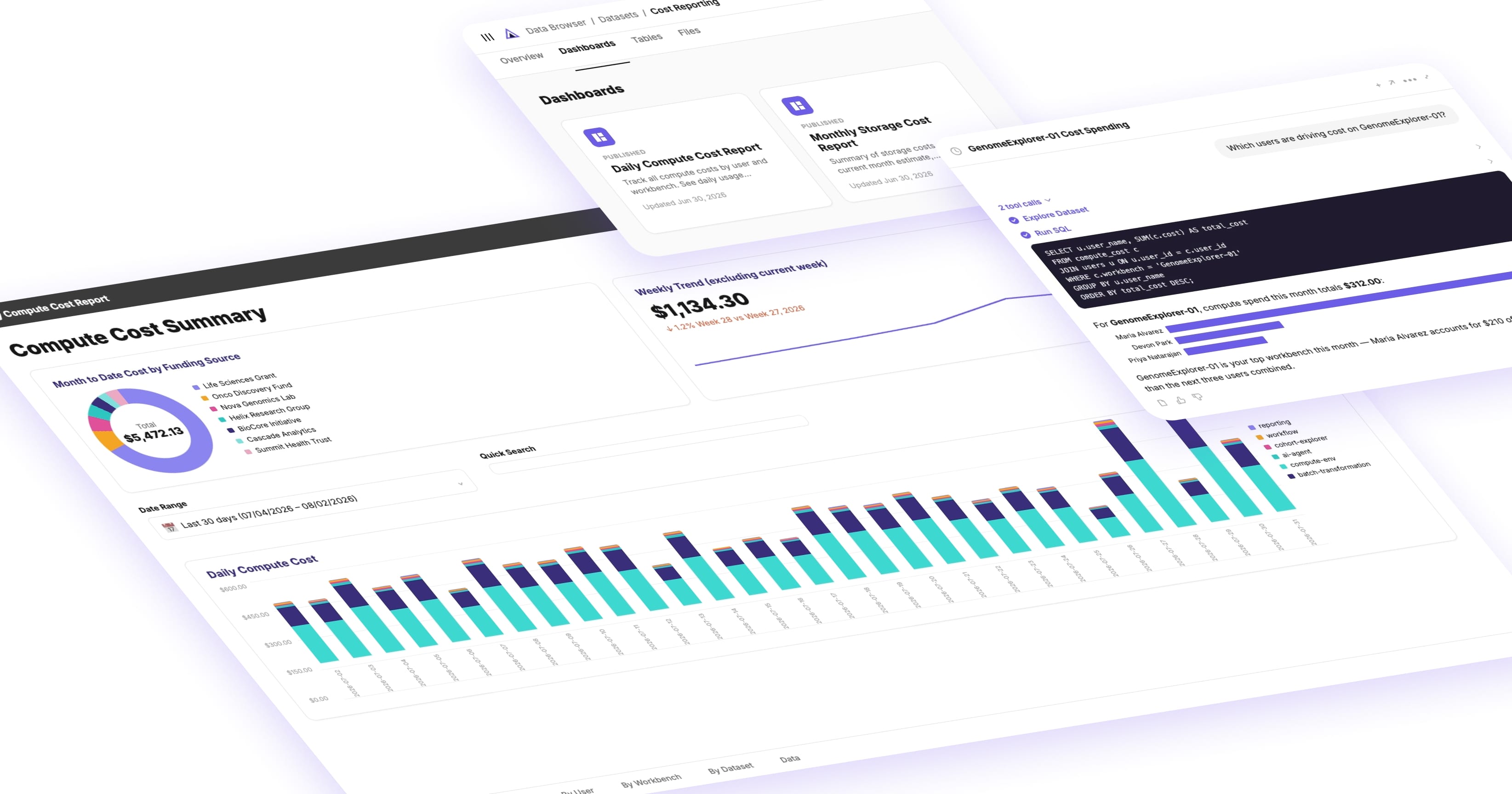

Cloud costs on a shared research platform can be challenging to attribute to their sources. A workbench runs queries, a batch workflow processes a few hundred samples, an AI agent burns through a long conversation, and the bill lands as one lump sum with little to no ways to trace it back to the team, project, or funding source that generated it.
For enterprises running chargeback models across departments and for research organizations answerable to grants, whether that’s IT or finance splitting costs across business units, someone has to know which workbenches are driving spend, which projects are responsible for the largest costs, and what a given funding source actually paid for. Grant-funded work, in particular, carries real accountability and attribution requirements. Without spend visibility, cost management turns into a monthly, time-intensive reconciliation exercise manually pulling AWS bills, cross-referencing usage logs, and guessing at attribution. Both problems come from the same root cause: variable, usage-based costs generated across a platform with no built-in way to track spend and attribute costs to the right sources.
Manifold's Cost Reports remove the guesswork by breaking down the platform spend by user, workbench, and funding source, so admins get chargeback-ready reporting and researchers can see exactly what their own work costs.
Cost Reports for Cloud Cost Transparency & Chargeback
Manifold’s Cost Reports track and attribute variable platform costs down to the user, workbench, workflow, and funding source level. Every customer instance ships with a Cost Reporting Dataset and direct API and UI access to individual cost data.
Admin Cost Reports give authorized admins full instance-wide chargeback visibility.
Individual User Cost Reports give researchers a narrower view scoped to their own activity and access tier.
Admin Cost Reports: instance-wide chargeback visibility
Every customer instance includes a Cost Reporting Dataset. Access is restricted to users with the Cost Manager role by default.
Authorized users get dashboards covering:
- Total cost over time
- Daily cost breakdown
- Cost by funding source
- Cost by workbench
- Cost by user
For questions the dashboards don't answer directly, admins can query the dataset with AI Agents and ask ad-hoc questions in plain language.
Because the Cost Reporting Dataset shows every user's costs across the instance, access is all or nothing. It is recommended to share it only with admins authorized to see instance-wide spend.
Why this matters
Chargeback reporting usually entails exporting bills and reverse-engineering attribution manually. Cost Reports turn that into a dashboard: admins get instance-wide visibility built for audit and allocation, and researchers get a direct answer to what their own workbenches, workflows, and AI usage actually cost.
For enterprise admins: budget planning and strategic allocation
Manual attribution costs time every single month: exporting AWS bills, matching resource tags to users, and reconciling numbers that may or may not add up. Cost Reports replace the spreadsheet reconciliation with dashboards broken out by user, workbench, and workflows.
Cost Reports also serve as an effective planning tool. When one workbench or team is driving a disproportionate share of compute spend, admins can see it early enough to reallocate funds or have the conversation before costs run past budget. Historical cost by workbench and by team also gives admins a real basis for setting next quarter's budget instead of guessing off last year's invoices.
In practice, Cost Reports enable admins to answer questions like:
- Which workbenches are driving the most compute spend?
- Which users are responsible for the largest spend?
- How much did the Product team spend on AI this month?
For principal investigators and project managers: grant accountability
Grant-funded work comes with real reporting obligations, which can be hard to meet when cost data lags a month behind. Cost Reports give principal investigators and project managers a view into their own spend, so staying within a grant's budget simply involves checking a dashboard instead of waiting for the finance team to find the right invoices, attribute them to the right sources, and finally run the report.
That visibility also supports the next grant application. Clean, granular spend history, by workflow, by month, by AI usage, makes it easier to build an accurate budget justification, demonstrate compliance with a prior award's conditions, and show the grant provider exactly how money was spent.
For researchers: fast answers on everyday spend
Researchers get the same clarity on day-to-day: spend. Knowing what a workflow cost after it runs, or what a month of AI-assisted analysis added up to means spend decisions happen before the invoice arrives.
In practice, Cost Reports enable researchers to answer questions like:
- "What did my workflow cost?"
- "How much did I spend on AI this month?"
- "What is the spend associated with my project?"
Get Access
Cost Reports are generally available now. If you manage a shared Manifold instance and need chargeback reporting or cost accountability for your team, connect with your Manifold account manager to get access.
FAQ
What are Manifold Cost Reports?
Cost Reports are Manifold's built-in cost attribution system, tracking variable platform costs by user, workbench, and funding source across compute, storage, batch workflows, and AI usage.
Who can see Admin Cost Reports?
Access is restricted to the Cost Manager role by default. Only Manifold, as the dataset owner, can grant or revoke access, since the dataset shows costs across the entire instance.
What costs are tracked?
Workbench compute (EC2 and attached storage), batch workflows (Cromwell and AWS HealthOmics), S3 prefix-based storage, AI conversation costs (Bedrock, Lambda, S3), and Snowflake query and storage costs.
How current is the cost data?
Costs are typically available within about 24 hours due to standard cloud provider reporting latency.
Does cost tracking apply retroactively?
No. Tracking begins the date the feature was enabled for your instance and doesn't cover prior usage.
Can individual researchers see their own costs?
Yes, for resources they have access to. Workflow costs are available today in the UI at the submission and run level, with broader coverage and API access on the roadmap.
